
Mar
25
2014
php bom去除工具,php批量去除bom的代码
php批量去除文件bom代码的功能,支持文件夹批量去除。具体php文件代码如下:
<?php
header('content-Type: text/html; charset=utf-8');
$auto=1;/*设置为1标示检测BOM并去除,设置为0标示只进行BOM检测,不去除*/
$basedir='.';
$loop=true;//www.phpernote.com
echo '当前查找的目录为:'.$basedir.'当前的设置是:';
echo '(1)',$loop?'检查当前目录以及当前目录的子目录':'只针对当前目录进行检测';
echo '(2)',$auto?'检测文件BOM同时去除检测到BOM文件的BOM<br />':'只检测文件BOM不执行去除BOM操作<br />';

checkdir($basedir,$loop);
function checkdir($basedir='',$loop=true){
	$basedir=empty($basedir)?'.':$basedir;
	if($dh=opendir($basedir)){
		while (($file=readdir($dh))!==false){
			if($file!='.'&&$file!='..'){
				if(!is_dir($basedir.'/'.$file)){
					echo '文件: '.$basedir.'/'.$file .checkBOM($basedir.'/'.$file).' <br>';
				}else{
					if(!$loop) continue;
					$dirname=$basedir.'/'.$file;
					checkdir($dirname);
				}
			}
		}
		closedir($dh);
	}
}
function checkBOM($filename){
	global $auto;
	$contents=file_get_contents($filename);
	$charset[1]=substr($contents,0,1);
	$charset[2]=substr($contents,1,1);
	$charset[3]=substr($contents,2,1);
	if(ord($charset[1])==239&&ord($charset[2])==187&&ord($charset[3])==191){
		if($auto==1){
			$rest=substr($contents,3);
			rewrite($filename,$rest);
			return (' <font color=red>找到BOM并已自动去除</font>');
		}else{
			return (' <font color=red>找到BOM</font>');
		}
	}else{
		return (' 没有找到BOM');
	}
}
function rewrite($filename,$data){
	$filenum=fopen($filename,'w');
	flock($filenum,LOCK_EX);
	fwrite($filenum,$data);
	fclose($filenum);
}
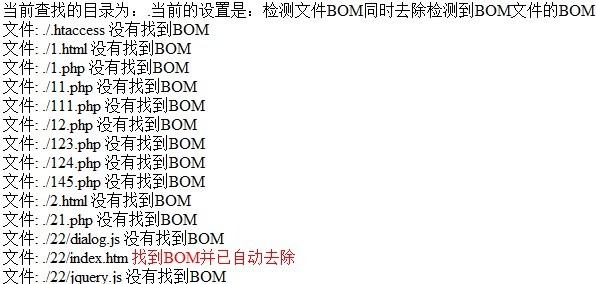
将以上代码保存为后缀为php的文件放到需要去除bom的文件目录里面,然后运行该php文件,将会对该目录以及该目录所有的子目录下的文件进行bom检查并去除bom,运行结果页面如下:

 微信扫一扫,打赏作者吧~
php bom去除工具,php批量去除bom的代码:等您坐沙发呢!
发表评论
